Monday, October 6, 2014

Structured Testing in small scale business


Testing Team Setup

Generally the small scale software companies believe that the processes especially testing processes are not applicable to them; and these are rather a luxurious entity affordable only to large scale counterparts.

Through this approach we will try to analyse why the testing team and testing processes are important even for small scale software companies.

Reasons

The typical reasons for not adapting the structured testing (includes test methodology, skilled team, process and tooling) are cost, time, lack of resources, complexity and focus.

What Happens?

What may go wrong with a typical small scale IT house that does not follow structured testing?
-          Obviously, it is likely that the buggy product might get delivered to the customer.
-          Without appropriate historical testing data it may be extremely challenging to estimate the task(s) or project(s) in our plate.
-          Generally, to overcome this - person dependent solutions may be applied. (e.g. person X can solve this, etc).
Overall, it becomes difficult to get a person independent view on reliability and stability of the product / release / patch or anything that gets delivered to the stakeholder.

So, what should be done?

Building a testing team and setting up the processes – first of all needs management support and nurturing. Following small steps can be used just to measure ‘whether structured testing can help organization’s needs?’; These steps should be executed at least for the period of Six months:
1.       Identify the owner:
Identify the owner from within the existing team who can grasp the testing skills and test management principles or contract / hire a skilled member.
2.       Build the team:
Explore and identify – people with testing inclination and interest from the existing group.
Candidates from non-IT wing of your organization who aspire to be in IT may turn out to be good candidates. Sometimes they prove to be of great advantage. (e.g. BPO candidates working on process would bring their process knowledge and that can prove very useful while building business scenarios)
3.       Build skill(s) sequentially:
It is recommended to start with the low hanging fruit first. And hence the following sequential steps may be useful:
1.       Start testing the release without test cases (i.e. finding defects with ad-hoc and exploratory tests): maintain defects in spreadsheet
2.       Start building checklist of important tests
3.       Write test cases
4.       Think about test data (e.g. this involves building separate table(s) / database, writing queries to populate required data, etc): start maintaining defects in open source defect management tool.
5.       Now write your testing approach and follow it across all projects
6.       Think about using a test automation tool (and automate 5 test cases with the simplest form of automation)
7.       Think about conducting load-performance test
8.       Expand your testing approach
Manual testing
4.       Identify Owners:
Each area needs internal owners to register the hurdles and own the paths to overcome those hurdles. E.g. owner for manual testing, owner for maintaining testing approach, owner for automation, etc.
5.       Measure the Benefits:
Measure the benefits and challenges observed during this pilot phase:
Sample benefits: uncovered defects, customer feedback on quality (before and after), etc.
Sample challenges: time spent on testing, development testing co-ordination, etc.
6.       Project benefits against the cost and decide:
With so much of efforts and time (minimum 6 months) spent on testing, it is the stage when organization’s management committee should project the benefits w.r.t. the probable cost that it may incur.
Consider the cost of people, tools, infrastructure for the first year.
I would also recommend now to introduce training cost for the remaining 6 months.

Based on this, project the defects that should be uncovered in-house and try flourishing your structure testing practice.
Every month – revisit the testing approach, compare cost vs benefits projection.

I am sure with these little steps, people will certainly identify “their own structured testing” – this is crucial; as each organization has different culture and thus needs different style of executing structured testing.

Wednesday, September 18, 2013

Test Strategy in Agile Project

Imagine if we build the test strategy in an interesting way  - where the strategy for each user story is managed separately in form of test story cards. Each USC (User Story Card) demands a specific approach and attention for testing. It becomes difficult to manage this in typical word / ppt that form the test strategy of the project.

Unlike the traditional approach the test strategy itself needs revision and recreation in agile projects. In such a case maintaining the USC specific aspects in the test story cards (TSC) is advisable.
The common aspects and dependencies that we need to address over sprints, across SCRUMS can be maintained in master test strategy - obviously with the reference of necessary test story cards.

One of the depiction of agile test strategy -

The master strategy can be a traditional word / ppt. However, it is extremely necessary that it is revised in sprint planning and even in retrospective.

It is advisable that we should not constraint ourselves with one approach of building the test strategy. Imagine here that - instead of Test Story Card - team builds mind map against each USC.

One of the core aspect of building the test strategy is planned dry run of the testing that we are going to perform. Rather than worrying more about the template, section, font - a true testing professional must focus on testing approach, technique, risks and most important the proposed testing solutions.

Test strategy should help the project; if it creates value - it will be demanded. Otherwise, merely following any approach with the label ('agile strategy', 'scrum test strategy') will bring in all the disadvantages which agile aims to wipe out.

We can create value for ourselves, otherwise no wonder if testing members get questions on what will you do - when developer is building the code. Refrain from building a strategy that does not add value to project - as sometime even an eMail is enough to define the true intent of test strategy.

Finally, thanks to Fiona Charles - who encouraged me yesterday (during EUROSTAR online conference) about blogging these thoughts.

Monday, September 16, 2013

Big Data --- is it big testing problem?

Lack of knowledge acts as bigger problem than lack of tools / skills to work with.
Probably this is the situation with relatively uncommon things in this world... Imagine new sport, newly discovered planet, new archeological evidence and even recent technology.

Probably Big Data and especially Big Data Testing is in similar zone at present. Like any product, to test Big Data based products we need -
different testing types (functional and non functional),
well formed test data management approach,
thoroughly planned test environment management.

Big Data processing involves three steps - gathering the data from various nodes, performing the (Map Reduce) operations to get the output and load the output on downstream systems for further processing.
As the technology deals with huge data, the functional testing needs to be carried out at every stage to detect the coding error and / or configuration (node) errors. This means that functional testing should involve minimum three stages:
- pre processing validation (on extracted data)
- Validation of processed data (before loading on downstream systems)
- Validation of extracted and loaded data.

Big Data technology is also associated with number of "V"s, some say Three, some say Four or even Five. From testing perspective, we will consider Volume, Velocity and Variety.

Volume:
Manual comparison is out of question considering the quantity. It might be carried out only on exceptional instances, that too in my opinion with sampling technique.
File comparison scripts / tools can be incorporated in parallel on multiple nodes.

Velocity:
Performance testing provides vital inputs on speed of operation and throughput of certain processes.

Variety:
Unstructured data (text based), social media data, log files, etc are some formats that add to variety of data handled by Big Data.
To compare structured data - the scripts need to be prepared that will produce the output in desired format and then the actual output can be compared with the desired output.
Verifying unstructured data - is the largely manual testing activity. Automation may not pay for this due to variety of formats handled. The best bet here is the analysis of unstructured data and building the best possible test scenarios to get the maximum coverage.

EDT of NFR testing:
Setting up the test environment, building the dummy data in volume and utilizing proper tools are key aspects o non functional testing and these are no longer different in Big Data Testing.

Situational Tests:
The situation that induced adoption of Big Data should also be reflected while building test scenarios.
e.g. For an investment bank government regulation may induce need of Big Data based structures.

Big Data has profound impact on global economy; Big Data testing does in turn demand a good mix of innovation and common sense, tools and test cases. Testing community should evolve and live up to this, we have done it in the past and we will keep doing it in future.

Friday, May 24, 2013

Keep your eyes "Open" .... to get a good toolset

A software tester with no tools to assist or help ... this is as horrible as one can imagine. If one still has any doubt why don't read this article before just freezing your view. So a tool is a vehicle, a resource! Well said.On its own the tool has limitations, it needs a human driver - who else other than us can be a good driver?

Once we agree on this point - let us take a step further and determine which tools we need. The biggest blunder is to 'assume' that if there is no automation or performance testing, then the tools are not required.

Let me make a small attempt to provide some vibrant thoughts:
- calculator available in your windows machine is your tool.
- windows accessibility options are your tools.
- zoom facility provided in browser is your tool.
- tools are required everywhere - NO MATTER WHAT TYPE OF TESTING IS INVOLVED.

So here is the sincere request from CAT - to keep your eyes "Open". With wide open eyes there are a number of free (& Open source) solutions available. Let me share list of some interesting tools and utilities:

Memtest - these are designed to stress test the X86 computers RAM. The default pass does 9 different tests, varying in access patterns and test data. For OSX, check Memtest OSX.

Webscarab - This  framework is used for analysing applications that communicate using the HTTP and HTTPS protocols. It is written in Java, and is thus portable to many platforms. One need to have at least  good understanding of the HTTP protocol to work with this tool.

nmon -  Provides performance data for AIX and Linux platforms and is used for for monitoring and analyzing the servers. A large number of details are provided by this tool e.g. CPU utilization, disk I/O rates, top processors, run queue information.

perfmon - SNMP based performance monitoring tool with web interface and facility to add new graphs.

PICT - a Microsoft algorith for pairwise testing. The concept of pair wise testing is extremely useful across testing phases and in both functional and non functional testing.

win32:  GUI Test - a Perl module for windows GUI automation

Xenu Link Sleuth - is a computer program to check broken hyperlinks.This is a proprietary software available at no charge.

Screen recorders:
Jing - captures images and video
CaptureFox - freeware Firefox add-on. It records every action within the browser.

HTTP: Recorder - Perl module Browser-independent recorder that records interactions with web sites.

Dexpot - a virtual desktop tool, that allows to switch between different virtual desktop connections easily.

This list is not complete, and in my opinion there can never be a complete list. However, this is a good starting point. There are other well known tools (for test automation, performance testing, security testing, etc) that are not in this list - but one can easily find them on internet.

Tuesday, March 26, 2013

Assess the Accessibility focus


A lot has been realized by most of us regarding the Accessibility of the application. There are different standards, laws and guidelines to help every one of us in building a product that provides equal opportunities to everyone in this society e.g. WCAG 2.0, Equality Act 2012, BS 8878, etc.
Rather than considering this as some form of enforcement on us, we need to understand the benefits associated with being accessibility compliant. But before this, let us look at few myths associated with accessibility:
  • Accessibility gives what is needed by people with special needs and elderly people.
Accessibility means providing great user experience, enjoyment – fun of use & right value of our product to disabled people.

  • In journey of accessibility compliance, web sites should follow WCAG 2.0.
WCAG is useful for techies / designers in building the website. WAI docs are useful in getting how disable people use net & for mobile site creators, browser developers, etc.
Along with such initiatives a standard like BS8878 is useful – as it provides entire process of how we should follow and maintain accessibility compliant web sites and associated tests.

  • There is not much ROI / What will be the return on investment?
The population aware of internet and using sites / apps for their regular tasks is increasing regularly. It is advisable to build accessibility compliant product.
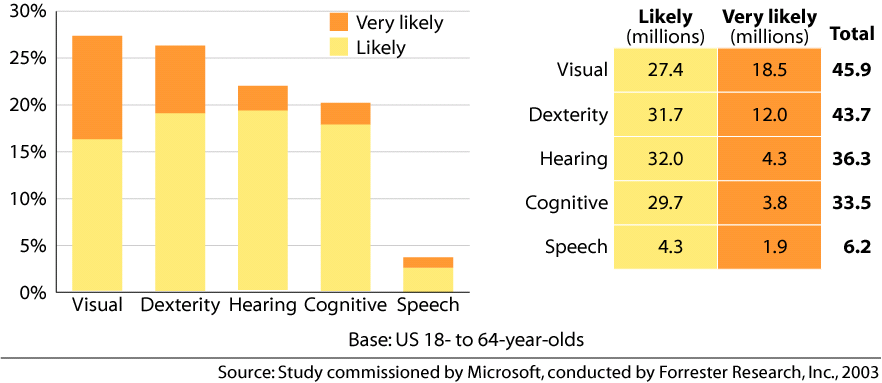
A joint study by Microsoft and Forrester conveys that- huge number of people are likely to be benefited from use of Accessible technology.


  • There is no need to perform separate testing for accessibility once the compliance / standard is followed.
Quality is conformance to the requirements; following the standards is not sufficient - unless the impact of compliance (during the development) is validated on different browsers.
Testing accessibility

This needs to be addressed case by case; however what all would like to understand is a common high level approach that can be used for accessibility testing.
This involves creating two fold matrix of your product.
Matrix – 1: Map the pages based on the level of compliance or type of accessibility solutions expected.
Matrix – 2: Map the pages to the checkpoints – this provides the details picture of which page should comply with which checkpoint.

For accessibility testing, merely validating the checkpoints on one browser is not sufficient; we should validate the accessibility checkpoints / test cases across multiple browsers and platforms.
This is a place where the concept of combinatorial testing is extremely useful. The algorithms provide us the good trade-off between number of combinations and coverage.

Once this framework is ready; it can be implemented on one product or entire portfolio. It is highly recommended to implement this across entire portfolio.

Few tips to remember when we talk about accessibility testing:
  • Comes without saying: If it is a web based application or native mobile app, Accessibility requirement comes without saying. In fact – even the desktop applications should be an accessible solution.
  • Brings in browser-platform support: the expectations from accessibility compliance automatically bring in the cross platform support for you site.
  • While testing the site – follow a thumb rule that the entire site should be accessible only with keyboard!
  • You should test multimedia pages without speakers … even if it sounds silly; this is the best possible way to identify and highlight the importance of text-video relation.
  • Do not rely on results of one tool.

Typical activities in the test strategy:
  • Static testing of code (for accessibility provisioning)
  • Browser testing – manual (checkpoint validation)
  • Check the pages without loading any image on the page
  • Use combination of tool driven tests and manual testing (online tools, JAWS, WAT 2.0).

Fitting this entire framework in your structured testing and risk based testing if obvious activity. 
We do get a question sometimes that how do we test accessibility in agile world ... Is agile world different as far as accessibility compliance is considered? Absolutely not. Merely, look at it as fitting the above framework in another framework (related to agile methodology). It is advisable to move upstream in case of accessibility testing (like any other testing). Jointly with developers - identify which type of test will add value upstream and then just 'add those cases'.


Saturday, November 24, 2012

Inputs beyond conventions

CAT came across two concepts recently - aesthetics in software testing and Conway's law.

These two are not directly linked with software testing in a way. However, when I was listing the primary inputs that we (testers) use apart from '(so called)documented requirements', I realized that such inputs are seldom considered. And as a result we loose out on few crucial aspects.

To elaborate further ... , let me list out typical aspects that we consider apart from requirements -
 - methodologies
 - techniques
 - framework
 - statistics
 - theories
 - industry benchmarks / trends

CAT witnessed a presentation in a conference - the speaker (T. Ashok from STAG software) talked on Aesthetics of software testing. Truly it is a nice concept, we generally do not dedicate ourselves to bring in the beauty in software testing activities like - test design, team composition, etc.
It is not that hard to bring in "beauty": e.g .Test artifacts can be beautified with grammar, clarity, 'apt' diagrams than huge paragraphs. Testing processes is beautified with clarity and yet discipline. Testing tools can be beautified with naming standards, comments, scripting practice and so on...
A point to note - whenever we are adding beauty, we are in fact adding value to testing! So beautifying is not merely the surplus-time activity.

Conway's law (one eponymous law) suggests that 'organizations that design systems are generally constrained to produce designs which are copies of their communication structures. Wow! Yet another interesting thought! It is like organization's soft-skills get reflected in its 'product'.
We as testers never focus on organization's soft-skills ....

Well, CAT is not suggesting to translate an organization communication structure into a test case and then dig out the defects ... neither the suggestion is to focus on beautification like 'color, fonts, width, huge coding standard documents, etc' beyond acceptable limit.
CAT is just asking all testing professionals to raise the questions(to oneself) like -
  do we pay enough attention on organization's soft skills .... ?
  has my team worked on beautifying the deliverable in true sense....?
  are we ignoring the obvious loophole in existing 'soft-skill' and its associated impact on product under test ....?

Few unconventional inputs to look for (in addition to those listed above) -
 - inter organization communication structure(as suggested by Conway's law)
 - existing QA / QC activities.
 - structure of BAs / product owner team/s.
 - Management structure.
 - Infrastructure availability.
For sure these might provide a useful link or association with one of the existing pain areas, loophole, etc.

We find a number of models / approach  / methods in industry that identify the common problems associated with the existing testing activity. Close look indicate that the 'unconventional inputs' provide vital information captured in 'assessment model' or 'compliance model' or 'audit checklist'. In CAT's opinion first an individual should focus & understand the unconventional inputs and then analyse them using one industry model.

What after we understand the problem areas from this exercise? We can design a solution - it could be transitioning approach / test centre (CoE) formation / automation / improvement in test strategy / change in existing toolkit ... anything.

So let us think unconventionally a bit...

Saturday, August 4, 2012

Generic onsite offshore model for testing

The most of the onsite offshore testing models revolve around the one shown in the image below. The core objective of having such a model is to get judicial mixes of onsite and offshore components for the various phases of software testing. While mixing these components, the general expectation from the offshore components is to deliver the cost savings to the clients / end customer without compromising the quality of the project deliverable.


The requirement gathering stage is executed onsite - at the client's premises; this helps the team to interact with the end users, requirement owners and understand implicit and explicit requirements. Outcome of this phase comprises of reverse knowledge transfer sessions from the project team (typically offshore), high level testing approach (with the list of business critical requirements), & high level estimation (or revisiting the proposal level estimation).

Team then comes back offshore & downloads the entire KT session to the offshore (expanded) team & generate detailed estimation and detailed test strategy. This strategy & estimation undergo at least three review rounds (a typical scenario) before team goes ahead and takes a deep dive further.

Hereon team builds high level scenarios, map them to NFRs, identify links between scenarios (as an input to end to end test cases), identifies the test data dependency, stub/harness/driver requirement, POC requirement, queries / unclear & ambiguous elements & share it with the requirement owners. Once these are reviewed and approved, the other deliverable are produced in sequence.

Obviously, as the best practice during every stage, the team is expected to revise the test strategy and test estimates and share it with the onsite team.

Matured model advocates face to face interactions between customer counterpart & offshore team in a meeting room during each review and approval stage. e.g. both onsite & offshore team member again interact for a week during signing off scenarios, test cases, execution results for each cycles & during the UAT support. These meetings can happen onsite or even at the offshore; I personally prefer to have all discussions where core work is happening. e.g. during application development & testing stage I will prefer to have all meetings at offshore development / test centre & during UAT support I recommend to have meetings at the location where UAT is taking place. Such frequent visits to onsite and offshore automatically wipe out dependencies, ill effects of distributed teams & most important misunderstanding.

No matter how we change or enhance such models or even build our proprietorial one, the importance and maturity will come if 'your way of working' wipes out ill effects of the distributed team, thereby sustain the quality & has tap on the cost.